Spatial-VTK
Spatial-VTK provides spatial validation tools for ground-motion simulations, including data QC, metric calculations, geologic metadata integration, spatial statistics, mapping, and dashboard preparation.
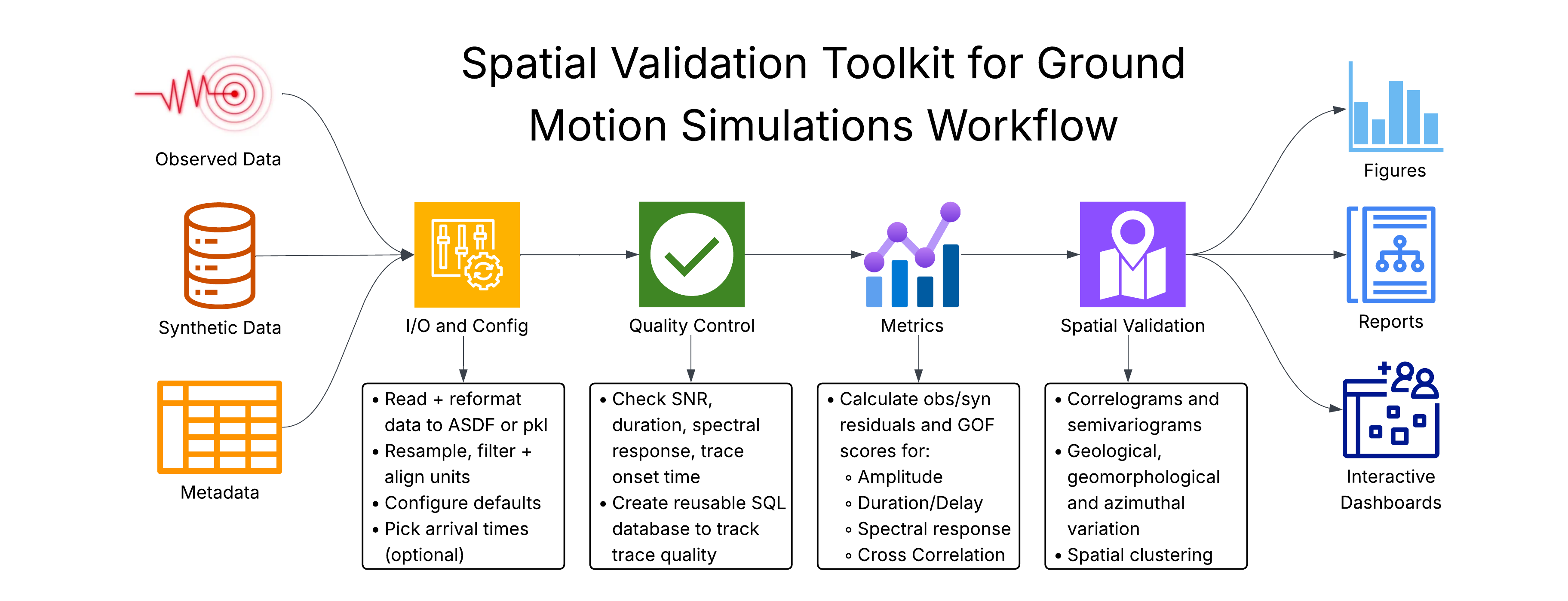
- Installation
- Use PhaseNet arrival picks (optional)
- Data Formats
- Configuration
- Start With This Example
- Choose Metric Groups Or Metrics
- Set Waveform Preprocessing
- Set Automatic QC Thresholds
- Submit Heavy Work To Slurm
- Show Or Hide Notebook Run Times
- Point Spatial-VTK At Your Config
- Use Configs In Python
- Default Output Names
- Use A Run Scenario
- Override One Run
- How Values Are Chosen
- Check The Current Settings
- Package Overview
- Examples and Tutorials
- Step 1: Ingest and Prepare Data
- Step 2: Build and Review QC Inventory
- Step 3: Calculate and Prepare Metrics
- Step 4: Add Metadata and Analyze Spatial Patterns
- Step 5: Work with GeoJSON Regions and Corridors
- Step 6: Explore Additional Plotting Options
- Step 7: Prepare and Launch Dashboards
- CLI Workflow Tutorial
- Residual convention
- Reference Documentation
- Troubleshooting
- Contact
- Changelog