Step 3: Calculate and Prepare Metrics
This notebook walks through the metric workflow outputs used by the rest of Spatial-VTK. You will resolve metric settings from the config, calculate amplitude and spectral metrics from Steps 1–2, create a long metrics table, and export dashboard-ready files.
Imports
These helpers resolve metric settings and write standard downstream metric outputs.
[1]:
from spatial_vtk.config.notebook import notebook_timer, register_svtk_cell_timer

with notebook_timer():
    from IPython.display import display
    from spatial_vtk.config import SpatialVTKConfig
    from spatial_vtk.config.metrics import metric_settings_summary, metrics_settings_from_config
    from spatial_vtk.io import read_config_table, load_output_table, write_output_table
    from spatial_vtk.metrics.workflow import summarize_metric_tasks, write_metric_outputs
    from spatial_vtk.metrics.plot import plot_band_score_distribution, plot_residuals_vs_distance, plot_score_trends
    from spatial_vtk.spatial.map import plot_station_metric_map
    register_svtk_cell_timer()
Run time: 1.52 s
Configuration
Load the config, then choose a small set of metrics and transforms for this tutorial run.
[2]:
from pathlib import Path

# Use the repository root so paths match the public source checkout.
from spatial_vtk.tutorials import tutorial_root
repo_root = tutorial_root()
# Metadata table paths are project-relative.
import os
os.chdir(repo_root)
config_path = repo_root / "data/examples/configuration/example_spatial_vtk_config.yaml"

# Load the tutorial run scenario and make it the active config for later package calls.
cfg = SpatialVTKConfig.from_file(config_path, run_scenario="tutorial").activate()

notebook_overrides = {
    "groups": ["amplitude", "spectral"],
    "transforms": ["ln_residual", "anderson_2004_gof"],
    "output_mode": "full",
}
Run time: 13.0 ms
Resolve the Metric Settings
The config file provides the defaults. The override above narrows the tutorial to amplitude and spectral metrics.
[3]:
# Resolve the metric plan from the active config plus the small notebook override.
metric_settings = metrics_settings_from_config(overrides=notebook_overrides)

# Display the metric settings with human-readable labels.
metric_settings_summary(metric_settings)
[3]:
| Setting | Value | |
|---|---|---|
| 0 | Groups | amplitude, spectral |
| 1 | Metrics | PGA, PGV, PGD, PSA, FAS |
| 2 | Transforms | ln(observed / synthetic), Anderson 2004 GOF |
| 3 | Components | Z, R, T |
| 4 | Passbands | 1-2 sec, 2-3 sec |
| 5 | Output mode | full |
| 6 | Spectral periods | 1.5 s, 2 s, 2.5 s, 3 s, 3.5 s, 4 s, 4.5 s, 5 s |
| 7 | Synthetic max frequency | 1 Hz |
Run time: 10.0 ms
Plan and Calculate Waveform Metrics
PGA/PGV/PGD use Step 1 processed waveforms and passband QC. PSA/FAS instead read the raw waveform paths, demean and cosine-taper them, apply one fourth-order zero-phase 1 Hz lowpass, and interpolate their common time window to 25 Hz. Both spectra use 1.5–5 s in 0.5 s steps, strictly excluding the 1 s simulation boundary. They are calculated once per pair/component, independently of the passbands. Passband QC and the 0.25 relative-amplitude cutoff are not applied to this spectral branch; finite values and record-length support are still checked. The full spectral calculation can take several minutes. Assertions check nonempty results, event/component coverage, and the ln residual relationship.
[4]:
from spatial_vtk.tutorials import build_metric_inventories
from spatial_vtk.io import metric_plan_from_config
from spatial_vtk.metrics.workflow import plan_metric_tasks, run_metric_tasks, tasks_to_frame
from dataclasses import replace

event_stations = load_output_table("event_station_records")
qc_inventory = load_output_table("qc_inventory")
observed_inventory, synthetic_inventory = build_metric_inventories(event_stations, config=cfg)
for source, inventory in [("observed", observed_inventory), ("synthetic", synthetic_inventory)]:
    inventory.to_csv(cfg.path("outputs.tables") / f"{source}_metric_inventory.csv", index=False)
# Amplitude inputs already have the Step 1 lowpass. Spectral tasks select raw paths and apply their own single lowpass.
plan = replace(metric_plan_from_config(cfg), waveform_lowpass_hz=None, waveform_resample_hz=None)
metric_tasks = plan_metric_tasks(observed_inventory, synthetic_inventory, plan=plan)
write_output_table("metric_tasks", tasks_to_frame(metric_tasks))
metric_rows = run_metric_tasks(metric_tasks, qc_table=qc_inventory)
import numpy as np
assert not metric_rows.empty, "No metrics calculated"
assert set(metric_rows.component) == {"Z", "R", "T"}
assert metric_rows.event_id.nunique() == 5
valid = metric_rows.dropna(subset=["value_obs", "value_syn", "ln_residual"])
assert len(valid) > 100, "Too few valid metric comparisons"
np.testing.assert_allclose(valid.ln_residual, np.log(valid.value_obs / valid.value_syn), rtol=1e-10, atol=1e-10)
metric_rows.to_parquet(cfg.path("outputs.tables") / "metric_rows.parquet", index=False)
metric_rows.head()
[4]:
| event_id | station | component | model | passband | metric_group | metric | period_s | value_obs | value_syn | ... | syn_waveform_path | spectral_processing | spectral_lowpass_obs_hz | spectral_lowpass_syn_hz | spectral_sample_rate_hz | spectral_common_start_s | spectral_common_end_s | spectral_npts | spectral_raw_obs_path | spectral_raw_syn_path | |
|---|---|---|---|---|---|---|---|---|---|---|---|---|---|---|---|---|---|---|---|---|---|
| 0 | ci38038071 | BFS | R | cvmsi_20260506_material_0p6x1p2_asdf | 1-2 sec | amplitude | PGA | NaN | 0.384463 | NaN | ... | /home/runner/work/spatial-vtk/spatial-vtk/outp... | NaN | NaN | NaN | NaN | NaN | NaN | NaN | NaN | NaN |
| 1 | ci38038071 | BFS | R | cvmsi_20260506_material_0p6x1p2_asdf | 1-2 sec | amplitude | PGV | NaN | 0.005630 | NaN | ... | /home/runner/work/spatial-vtk/spatial-vtk/outp... | NaN | NaN | NaN | NaN | NaN | NaN | NaN | NaN | NaN |
| 2 | ci38038071 | BFS | R | cvmsi_20260506_material_0p6x1p2_asdf | 1-2 sec | amplitude | PGD | NaN | 0.000863 | NaN | ... | /home/runner/work/spatial-vtk/spatial-vtk/outp... | NaN | NaN | NaN | NaN | NaN | NaN | NaN | NaN | NaN |
| 3 | ci38038071 | BFS | R | cvmsi_20260506_material_0p6x1p2_asdf | 2-3 sec | amplitude | PGA | NaN | 0.019404 | NaN | ... | /home/runner/work/spatial-vtk/spatial-vtk/outp... | NaN | NaN | NaN | NaN | NaN | NaN | NaN | NaN | NaN |
| 4 | ci38038071 | BFS | R | cvmsi_20260506_material_0p6x1p2_asdf | 2-3 sec | amplitude | PGV | NaN | 0.000859 | NaN | ... | /home/runner/work/spatial-vtk/spatial-vtk/outp... | NaN | NaN | NaN | NaN | NaN | NaN | NaN | NaN | NaN |
5 rows × 33 columns
Run time: 2 min 5.5 s
Write Standard Metric Outputs
The long metrics table keeps observed values, synthetic values, residuals, scores, and metadata in one row-oriented format.
[5]:
# Read prepared station metadata for metric enrichment.
stations = load_output_table("prepared_stations")

# Read prepared event metadata for metric enrichment.
events = load_output_table("prepared_events")

# Write the standard long metrics, path summary, and dashboard-ready metric outputs.
write_metric_outputs(
    metric_rows,
    events=events,
    stations=stations,
    residual_column="ln_residual",
    score_column="anderson_2004_gof",
    table_format="parquet",
)

# Read the long metrics table written by the workflow helper.
metrics_long = load_output_table("metrics_long")

# Save the enriched metrics table used by the spatial and mapping notebooks.
write_output_table("metrics_enriched", metrics_long)
metrics_long.head()
[5]:
| event_id | station | component | model | passband | metric_group | metric | period_s | value_obs | value_syn | ... | dip | rake | usgs_url | observed_pickle | event_json | synthetic_mseed | selected_station_count | overlapping_broadband_station_count | network | event_count | |
|---|---|---|---|---|---|---|---|---|---|---|---|---|---|---|---|---|---|---|---|---|---|
| 0 | ci38038071 | BFS | R | cvmsi_20260506_material_0p6x1p2_asdf | 1-2 sec | amplitude | PGA | NaN | 0.384463 | NaN | ... | 79.0 | 178.0 | https://earthquake.usgs.gov/earthquakes/eventp... | data/examples/example_five_event_subset/observ... | data/examples/example_five_event_subset/observ... | data/examples/example_five_event_subset/synthe... | 30 | 52 | CI | 4 |
| 1 | ci38038071 | BFS | R | cvmsi_20260506_material_0p6x1p2_asdf | 1-2 sec | amplitude | PGV | NaN | 0.005630 | NaN | ... | 79.0 | 178.0 | https://earthquake.usgs.gov/earthquakes/eventp... | data/examples/example_five_event_subset/observ... | data/examples/example_five_event_subset/observ... | data/examples/example_five_event_subset/synthe... | 30 | 52 | CI | 4 |
| 2 | ci38038071 | BFS | R | cvmsi_20260506_material_0p6x1p2_asdf | 1-2 sec | amplitude | PGD | NaN | 0.000863 | NaN | ... | 79.0 | 178.0 | https://earthquake.usgs.gov/earthquakes/eventp... | data/examples/example_five_event_subset/observ... | data/examples/example_five_event_subset/observ... | data/examples/example_five_event_subset/synthe... | 30 | 52 | CI | 4 |
| 3 | ci38038071 | BFS | R | cvmsi_20260506_material_0p6x1p2_asdf | 2-3 sec | amplitude | PGA | NaN | 0.019404 | NaN | ... | 79.0 | 178.0 | https://earthquake.usgs.gov/earthquakes/eventp... | data/examples/example_five_event_subset/observ... | data/examples/example_five_event_subset/observ... | data/examples/example_five_event_subset/synthe... | 30 | 52 | CI | 4 |
| 4 | ci38038071 | BFS | R | cvmsi_20260506_material_0p6x1p2_asdf | 2-3 sec | amplitude | PGV | NaN | 0.000859 | NaN | ... | 79.0 | 178.0 | https://earthquake.usgs.gov/earthquakes/eventp... | data/examples/example_five_event_subset/observ... | data/examples/example_five_event_subset/observ... | data/examples/example_five_event_subset/synthe... | 30 | 52 | CI | 4 |
5 rows × 66 columns
Run time: 384.9 ms
Make Metric Diagnostic Figures
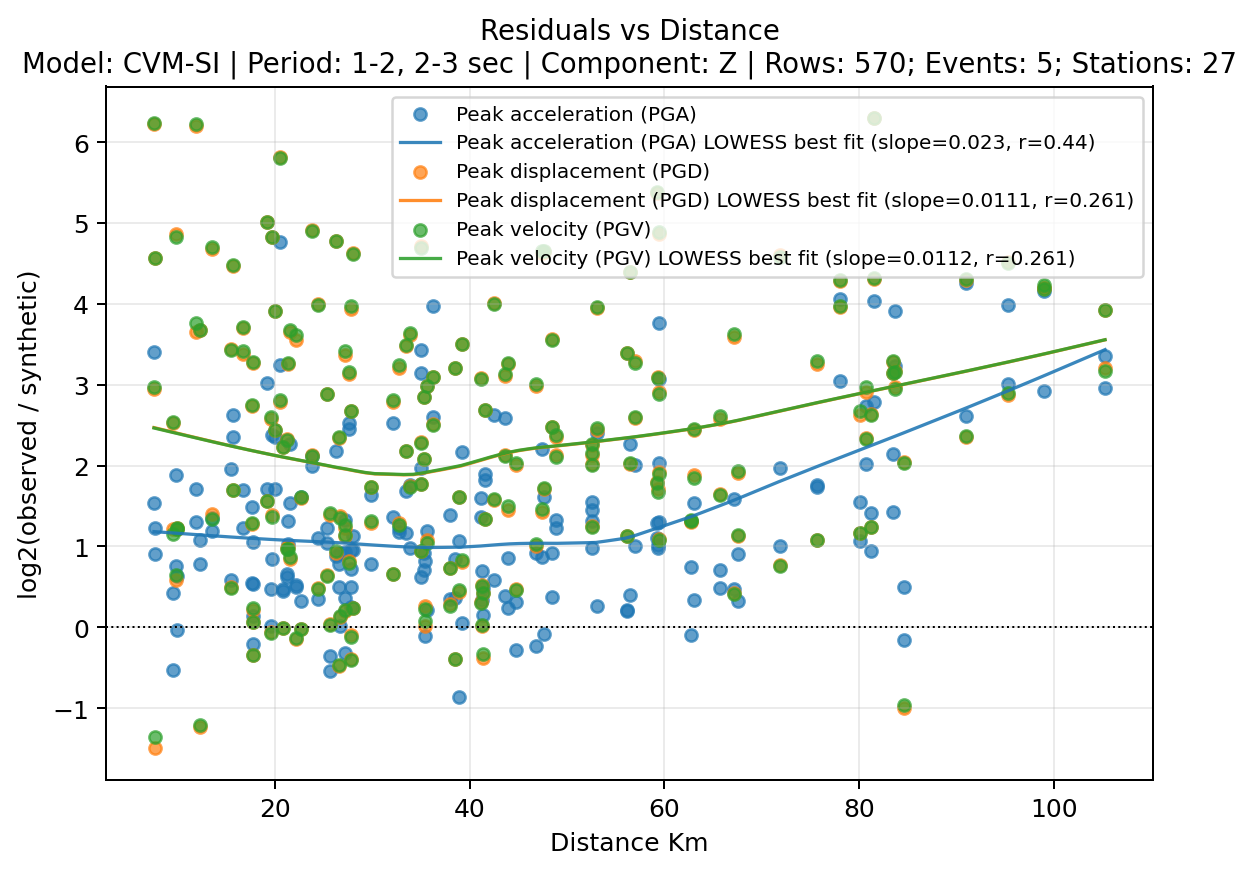
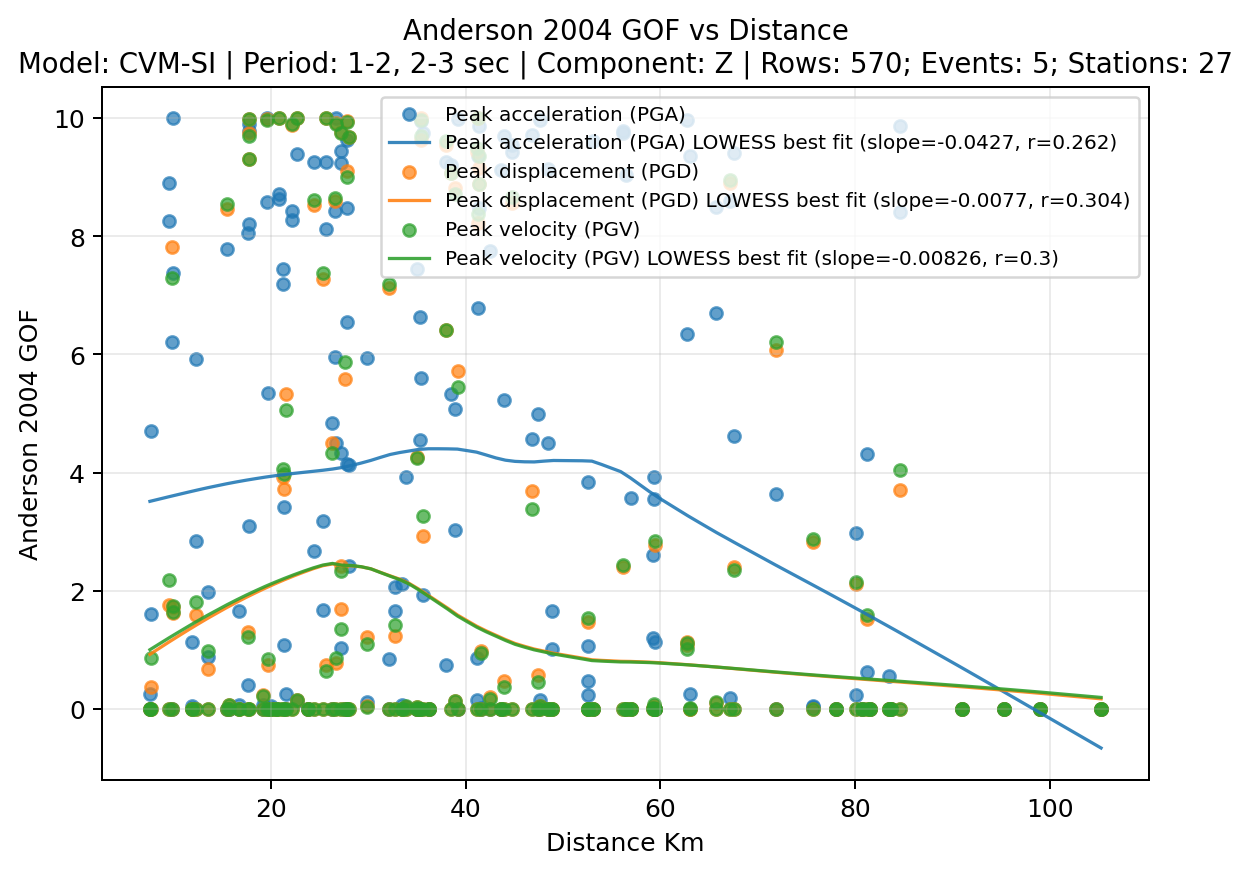
These figures use a larger QC-passed metrics table so the trends are easier to inspect than they would be with a small teaching subset. The distance plots use LOWESS fits so the trend lines stay flexible without forcing a straight-line relationship.
[6]:
# Use the native ln metric results calculated in Step 3.
figure_metrics = metrics_long.loc[metrics_long["component"].eq("Z")].copy()

# Keep these example figures focused on metrics with enough rows to show clear trends.
figure_metrics = figure_metrics.loc[figure_metrics["metric"].isin(["PGA", "PGV", "PGD"])].copy()

# Plot residuals against source-to-station distance with a LOWESS fit for each metric.
distance_fig = plot_residuals_vs_distance(
    figure_metrics,
    y_col="ln_residual",
    group_col="metric",
    fit="lowess",
    connect_points=False,
    title="Residuals vs Distance",
    showfig=True,
    savefig=True,
)

# Plot GOF scores against distance with a LOWESS fit for each metric.
score_fig = plot_score_trends(
    figure_metrics,
    score_col="anderson_2004_gof",
    group_col="metric",
    fit="lowess",
    connect_points=False,
    title="Anderson 2004 GOF vs Distance",
    showfig=True,
    savefig=True,
)
Run time: 910.9 ms
Map Station Residuals
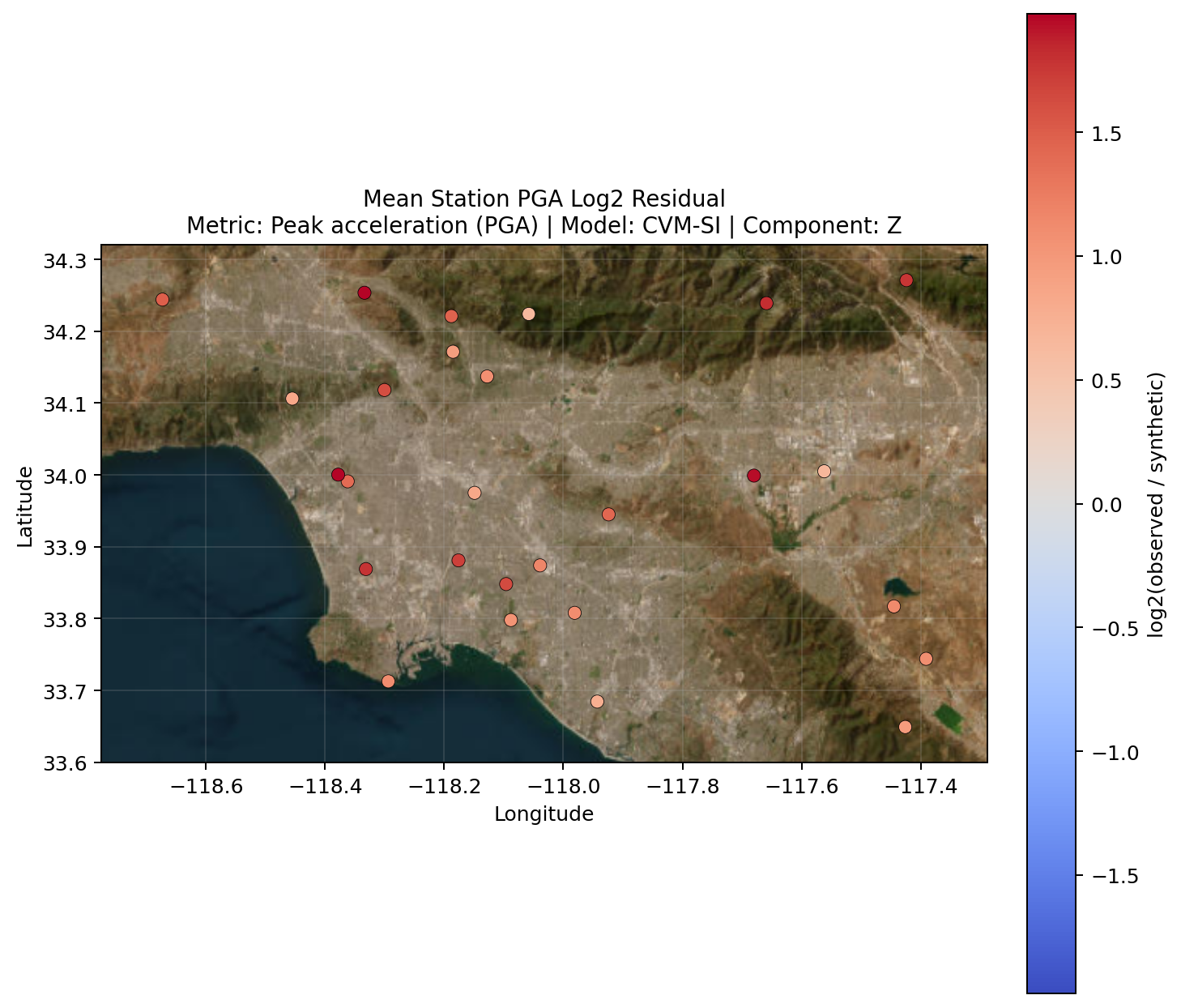
A station map is a useful first look at whether residuals are spatially organized. Here, each station is colored by its mean PGA ln residual.
[7]:
# Average PGA residuals by station so each station appears once on the map.
station_pga = (
    figure_metrics.loc[figure_metrics["metric"].eq("PGA")]
    .groupby(["station", "sta_lat", "sta_lon", "model", "component", "metric"], dropna=False, as_index=False)["ln_residual"]
    .mean()
)

# Map mean station residuals with a basemap for geographic context.
station_metric_fig = plot_station_metric_map(
    station_pga,
    value_col="ln_residual",
    title="Mean Station PGA ln Residual",
    showfig=True,
    savefig=True,
)
Run time: 2.11 s
Compare Residuals by Period Band
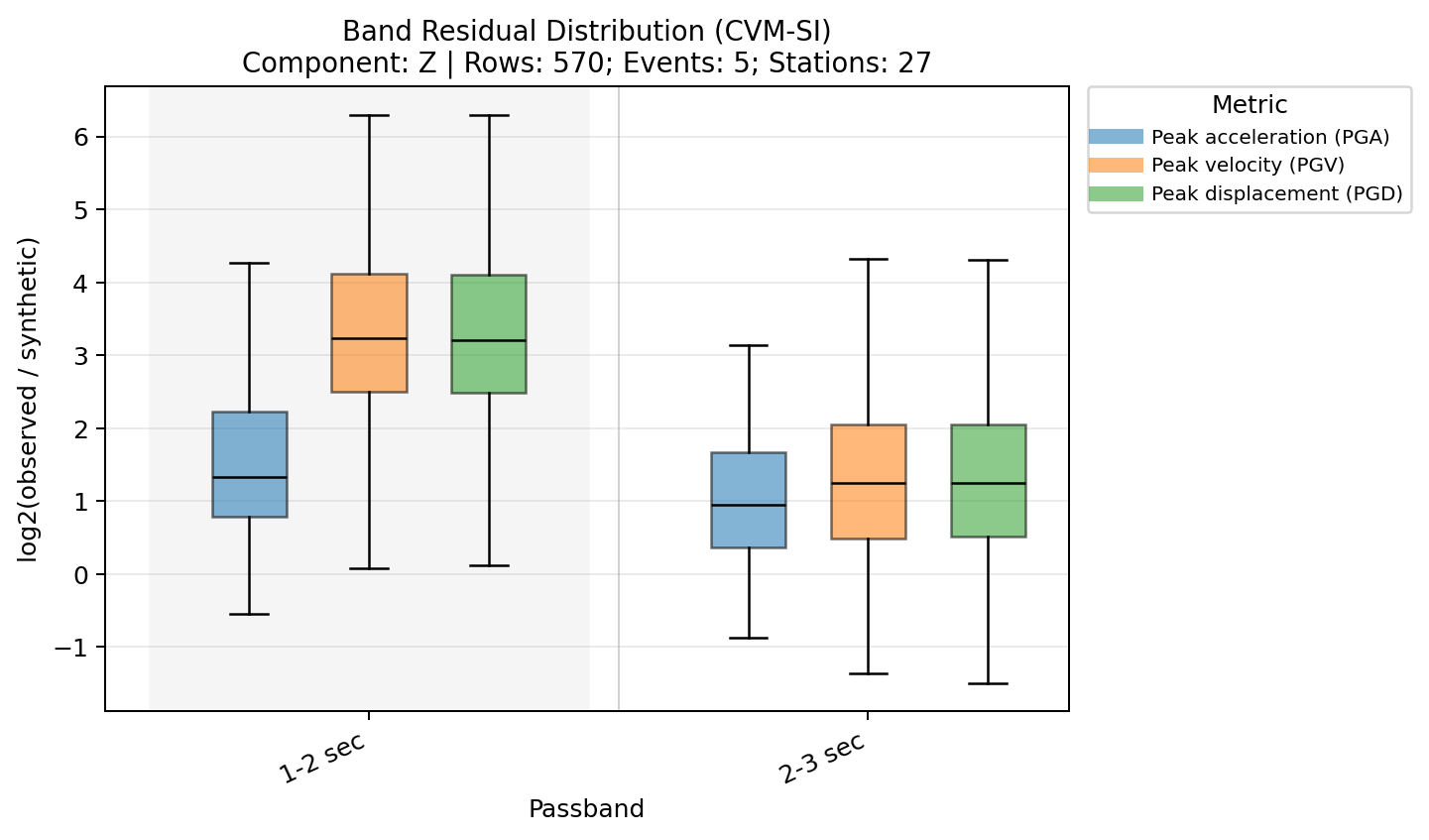
This distribution groups ln residuals by period band and metric so you can quickly see whether residual behavior changes across the requested bands.
[8]:
# Compare ln residual distributions across period bands for the same metric set.
band_residual_fig = plot_band_score_distribution(
    figure_metrics,
    band_col="band",
    score_col="ln_residual",
    color_col="metric",
    title="Band Residual Distribution (CVM-SI)",
    showfig=True,
    savefig=True,
)
Run time: 313.6 ms