Step 1: Ingest and Prepare Data
This notebook starts with the files you normally bring to Spatial-VTK: observed waveforms, synthetic waveforms, station metadata, event metadata, and a table that connects events to stations. By the end, you will have prepared metadata tables, reusable preprocessed waveform files, and context figures that help you understand the example dataset before QC or metric calculations.
Imports
These imports prepare metadata, preprocess waveform files, and make the first context figures.
[1]:
from spatial_vtk.config.notebook import notebook_timer, register_svtk_cell_timer

with notebook_timer():
    from spatial_vtk.config import SpatialVTKConfig
    from spatial_vtk.io import (
        prepare_event_metadata,
        prepare_event_station_table,
        prepare_station_metadata,
        preprocess_waveform_files,
        write_output_tables,
    )
    from spatial_vtk.visualize.context import (
        build_record_coverage_table_from_trace_metadata,
        plot_event_coverage,
        plot_station_event_beachball_map,
        plot_record_coverage,
        plot_station_coverage,
        plot_station_event_context,
    )
    register_svtk_cell_timer()
Run time: 1.00 s
Configuration
Load the tutorial config, then set the few values this notebook changes for display.
[2]:
from pathlib import Path

# Use the repository root so paths match the public source checkout.
from spatial_vtk.tutorials import tutorial_root
repo_root = tutorial_root()
# Metadata table paths are project-relative.
import os
os.chdir(repo_root)
config_path = repo_root / "data/examples/configuration/example_spatial_vtk_config.yaml"

# Load the tutorial run scenario and make it the active config for later package calls.
cfg = SpatialVTKConfig.from_file(config_path, run_scenario="tutorial").activate()

notebook_overrides = {"add_basemap": True}

# Use basemaps in the context maps so locations are easy to inspect.
add_basemap = notebook_overrides["add_basemap"]
from spatial_vtk.tutorials import verify_waveforms
verify_waveforms(repo_root)
[2]:
{'version': 1,
 'provenance': 'See extraction_manifest.json and data/examples/README.md. Byte-for-byte original observed gmprocess and Salvus synthetic inputs; no processed copies.',
 'files': [{'path': 'observed/ci38038071.mseed',
   'bytes': 11476992,
   'sha256': 'b2f8bb0436256f5fc99b5cb706074df92a17d1cf1b8fa18ecabce8f654970d60'},
  {'path': 'observed/ci38695658.mseed',
   'bytes': 23076864,
   'sha256': 'a16086298e16720399d5f2f1e06bb3aa8c832ec8125043dac6683c72fc2ca803'},
  {'path': 'observed/ci39756418.mseed',
   'bytes': 17485824,
   'sha256': '0aa1f18aef9cce560f5e3ce72d5dde8adff53e94aa837d6b963bda77dfd99cea'},
  {'path': 'observed/ci39812319.mseed',
   'bytes': 12140544,
   'sha256': '4d1cbb1f106558bcb3b565327016f6411749b7ad6756e789427863ff22f3309c'},
  {'path': 'observed/ci40699207.mseed',
   'bytes': 19943424,
   'sha256': '88dbac4b2aab2e526bccf8c12971f8945ece5447c0a717f303eb4b4b1b668490'},
  {'path': 'synthetics/cvmsi_20260506_material_0p6x1p2_asdf/ci38038071.mseed',
   'bytes': 32071680,
   'sha256': '406ed8ad6889ea96ed579e492b08ac6116112fbe3258fe603a9cb76704c20199'},
  {'path': 'synthetics/cvmsi_20260506_material_0p6x1p2_asdf/ci38695658.mseed',
   'bytes': 32071680,
   'sha256': '13f612ac633c2383229fa3508afabfb1d1e282d4a5ac8fdda158729c3a296ba7'},
  {'path': 'synthetics/cvmsi_20260506_material_0p6x1p2_asdf/ci39756418.mseed',
   'bytes': 32071680,
   'sha256': '705a98a783ffbc5f8dfc4f1478b7d893a21797729d6810e5522a43ba916a22d7'},
  {'path': 'synthetics/cvmsi_20260506_material_0p6x1p2_asdf/ci39812319.mseed',
   'bytes': 32071680,
   'sha256': 'a6e32a4df25a1418aa77cc9e267679f8b6460deb618e2b8c5c6dac17dcf25a46'},
  {'path': 'synthetics/cvmsi_20260506_material_0p6x1p2_asdf/ci40699207.mseed',
   'bytes': 32071680,
   'sha256': 'c1b8314f0aa50a42b3adfd4d7599848adae3d116349bed5c28528556c368bb39'}]}
Run time: 215.7 ms
Prepare Metadata
Spatial-VTK standardizes common station and event column names, so later steps can use the same fields no matter what the original file called them.
[3]:
# Read and standardize station metadata from the active config.
stations = prepare_station_metadata()

# Read and standardize event metadata from the active config.
events = prepare_event_metadata()

# Combine event and station metadata into the event-station record table.
event_stations = prepare_event_station_table(
    station_metadata=stations,
    event_metadata=events,
)

stations.head()
[3]:
| station | network | lat | lon | event_count | |
|---|---|---|---|---|---|
| 0 | BFS | CI | 34.239 | -117.659 | 4 |
| 1 | BHP | CI | 33.991 | -118.362 | 5 |
| 2 | BLC | CI | 34.244 | -118.673 | 4 |
| 3 | BRE | CI | 33.808 | -117.981 | 5 |
| 4 | CHN | CI | 33.999 | -117.680 | 5 |
Run time: 53.1 ms
[4]:
events[["event_id", "event_name", "start", "event_lat", "event_lon", "magnitude", "depth_km"]].head()
[4]:
| event_id | event_name | start | event_lat | event_lon | magnitude | depth_km | |
|---|---|---|---|---|---|---|---|
| 0 | ci38038071 | M 4.4 - 4km N of La Verne, CA | 2018-08-29T02:33:28.330000+00:00 | 34.136333 | -117.774667 | 4.38 | 5.46 |
| 1 | ci38695658 | M 4.5 - 3km WSW of South El Monte, CA | 2020-09-19T06:38:46.930000+00:00 | 34.038000 | -118.080000 | 4.54 | 16.87 |
| 2 | ci39812319 | M 4.3 - 2km E of Carson, CA | 2021-09-18T02:58:34.700000+00:00 | 33.831333 | -118.263667 | 4.28 | 11.86 |
| 3 | ci39756418 | M 4.2 - 3 km SW of San Bernardino, CA | 2024-01-25T03:43:19.970000+00:00 | 34.111667 | -117.311500 | 4.24 | 15.78 |
| 4 | ci40699207 | M 4.4 - 4 km SSE of Highland Park, CA | 2024-08-12T19:20:24.670000+00:00 | 34.082500 | -118.178833 | 4.39 | 10.98 |
Run time: 7.5 ms
Preprocess Waveforms
The tutorial config applies a 1 Hz lowpass to both observed and synthetic waveforms. This step writes those processed files once, then updates the event-station table so QC, metrics, and waveform figures use the same processed inputs.
[5]:
# Filter and cache observed/synthetic waveform files using the active config settings.
preprocessing_result = preprocess_waveform_files(event_stations, config=cfg, verbose=True)

# Use the updated table with processed waveform paths for downstream notebooks.
event_stations = preprocessing_result.event_station_records

# Build record coverage from measured trace start/end times relative to each event origin.
record_coverage = build_record_coverage_table_from_trace_metadata(
    preprocessing_result.trace_metadata,
    event_station_df=event_stations,
    component="Z",
)

# Save standard handoff tables using the config output registry.
written_tables = write_output_tables(
    prepared_stations=stations,
    prepared_events=events,
    event_station_records=event_stations,
    record_coverage=record_coverage,
    cfg=cfg,
)
print(f"Wrote record coverage: {written_tables['record_coverage']}")

preprocessing_result.manifest[["source", "event_id", "status", "processing", "trace_count"]].head()
Preprocessing waveforms into /home/runner/work/spatial-vtk/spatial-vtk/outputs/tutorials/preprocessed_waveforms
Resolved waveform sources: observed, synthetic
observed: 5 unique event waveform file(s) from column 'observed_pickle'
observed 1/5 event ci38038071: writing ci38038071.mseed
observed event ci38038071: written (90 trace(s))
observed 2/5 event ci38695658: writing ci38695658.mseed
observed event ci38695658: written (84 trace(s))
observed 3/5 event ci39812319: writing ci39812319.mseed
observed event ci39812319: written (87 trace(s))
observed 4/5 event ci39756418: writing ci39756418.mseed
observed event ci39756418: written (78 trace(s))
observed 5/5 event ci40699207: writing ci40699207.mseed
observed event ci40699207: written (81 trace(s))
synthetic: 5 unique event waveform file(s) from column 'synthetic_mseed'
synthetic 1/5 event ci38038071: writing ci38038071.mseed
synthetic event ci38038071: written (90 trace(s))
synthetic 2/5 event ci38695658: writing ci38695658.mseed
synthetic event ci38695658: written (90 trace(s))
synthetic 3/5 event ci39812319: writing ci39812319.mseed
synthetic event ci39812319: written (90 trace(s))
synthetic 4/5 event ci39756418: writing ci39756418.mseed
synthetic event ci39756418: written (90 trace(s))
synthetic 5/5 event ci40699207: writing ci40699207.mseed
synthetic event ci40699207: written (90 trace(s))
Wrote event-station records: /home/runner/work/spatial-vtk/spatial-vtk/outputs/tutorials/preprocessed_waveforms/metadata/event_station_records_preprocessed.csv
Wrote preprocessing manifest: /home/runner/work/spatial-vtk/spatial-vtk/outputs/tutorials/preprocessed_waveforms/metadata/waveform_preprocessing_manifest.csv
Wrote trace metadata: /home/runner/work/spatial-vtk/spatial-vtk/outputs/tutorials/preprocessed_waveforms/metadata/trace_metadata_preprocessed.csv
Wrote record coverage: /home/runner/work/spatial-vtk/spatial-vtk/outputs/tutorials/tables/record_coverage.csv
[5]:
| source | event_id | status | processing | trace_count | |
|---|---|---|---|---|---|
| 0 | observed | ci38038071 | written | Filter: lowpass 1 Hz | 90 |
| 1 | observed | ci38695658 | written | Filter: lowpass 1 Hz | 84 |
| 2 | observed | ci39812319 | written | Filter: lowpass 1 Hz | 87 |
| 3 | observed | ci39756418 | written | Filter: lowpass 1 Hz | 78 |
| 4 | observed | ci40699207 | written | Filter: lowpass 1 Hz | 81 |
Run time: 4.89 s
Make Context and Record Coverage Figures
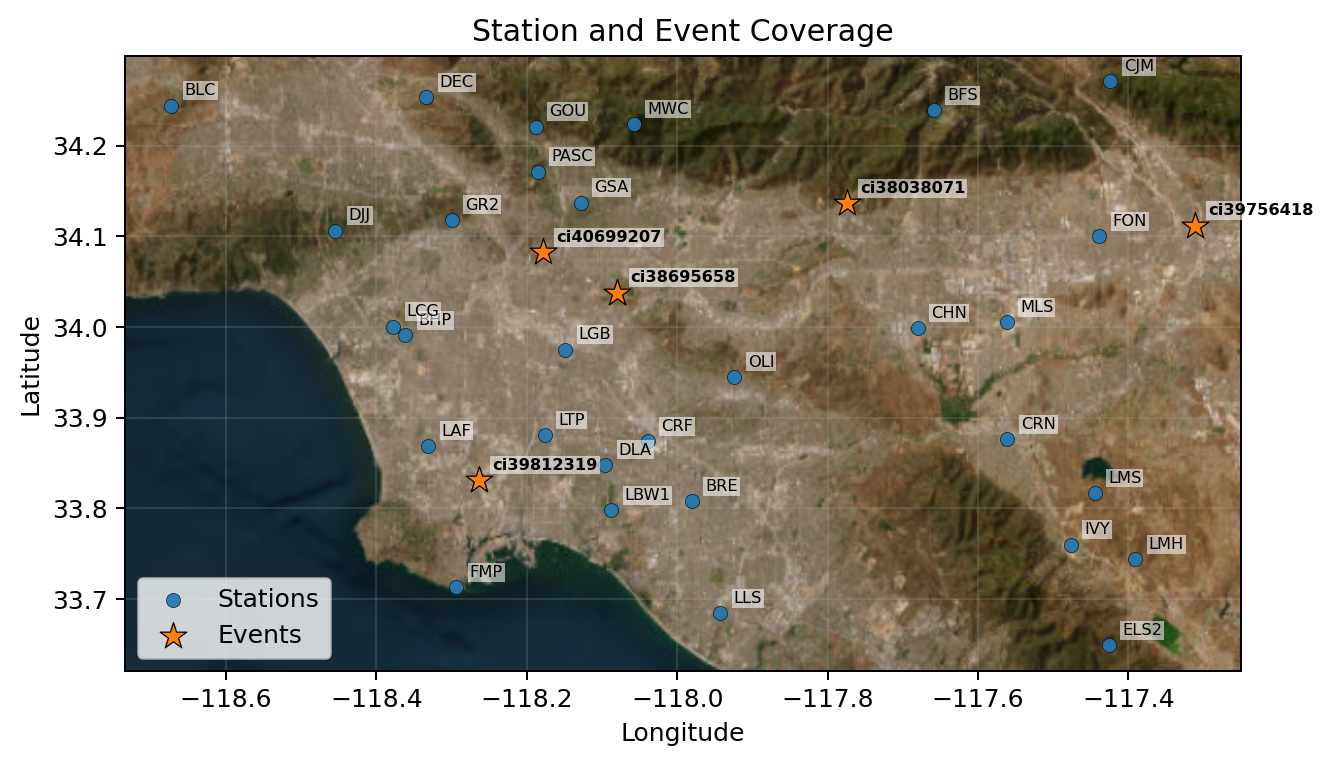
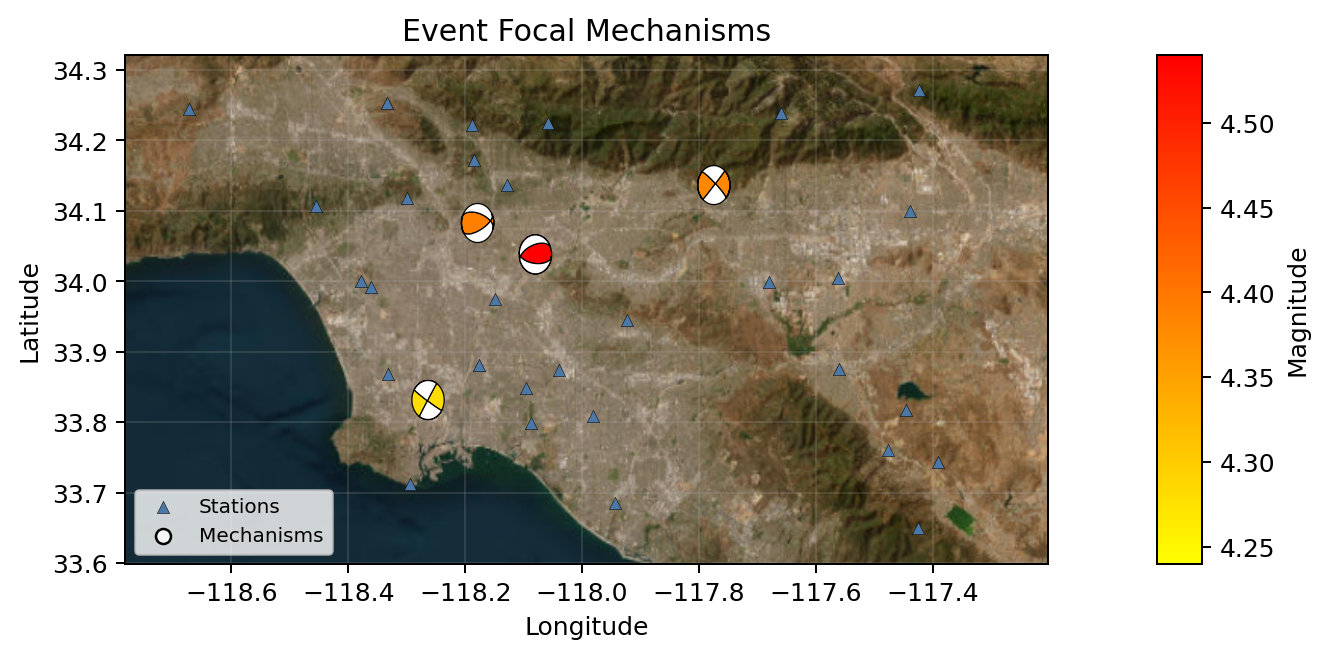
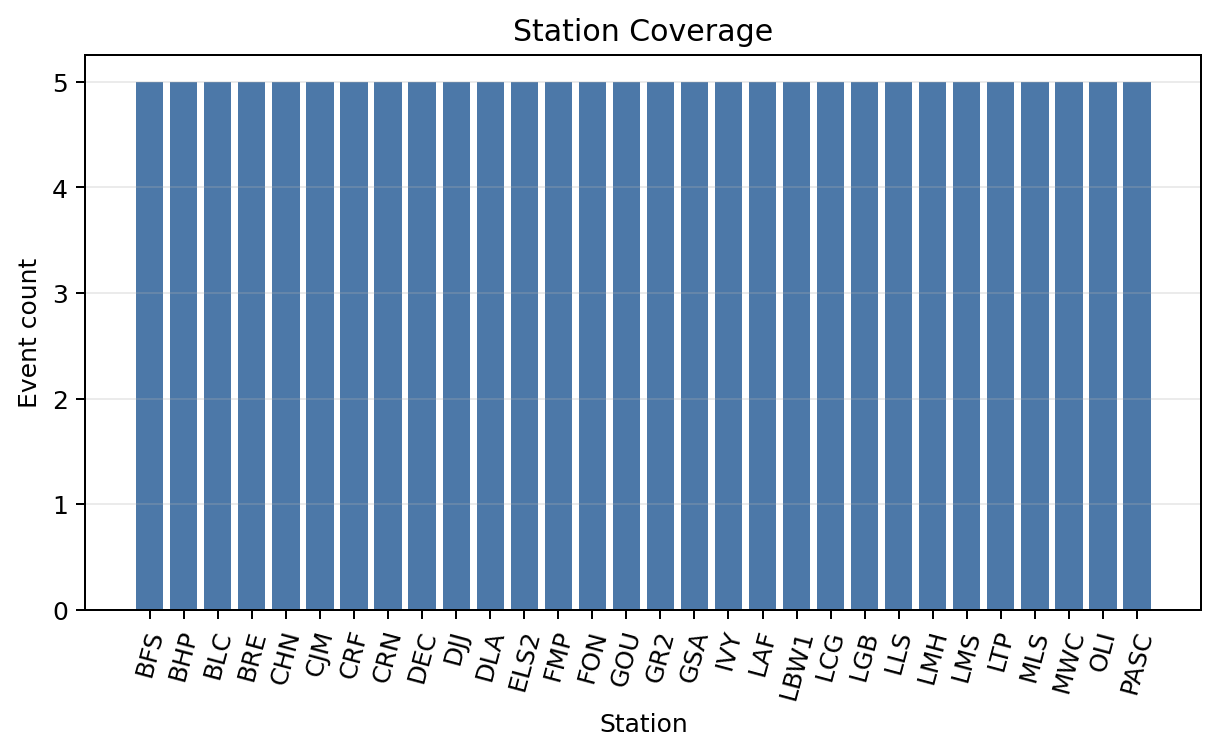
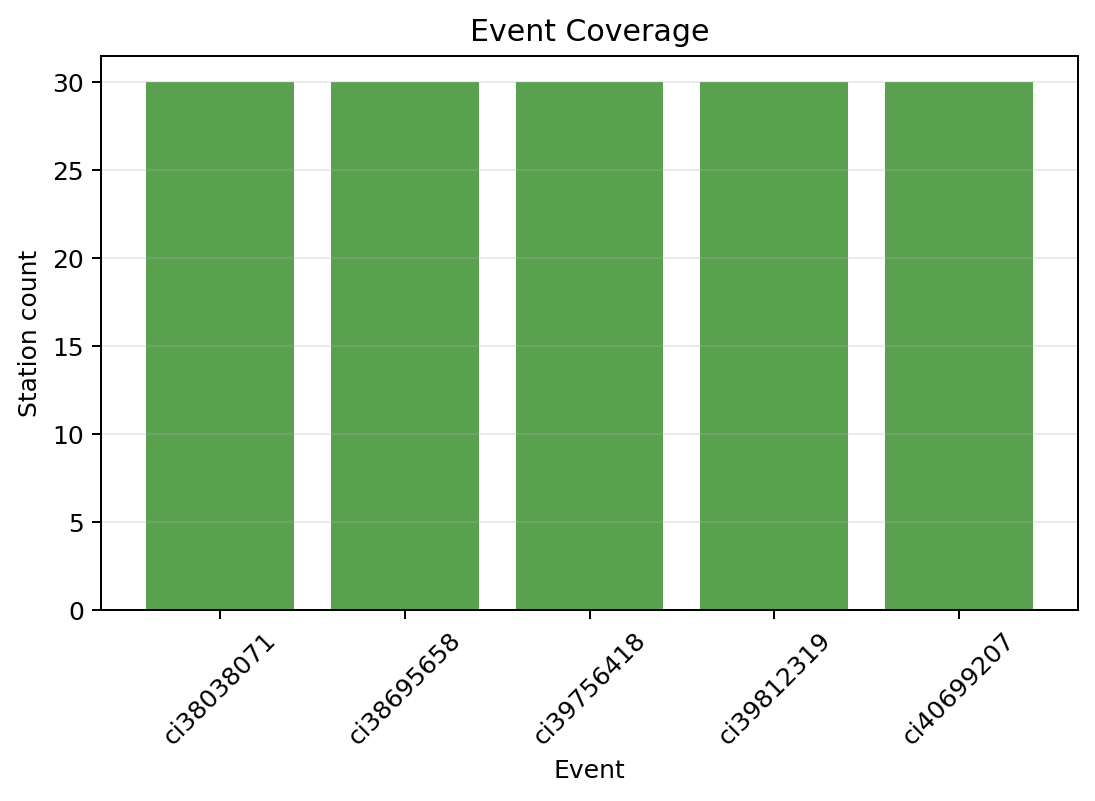
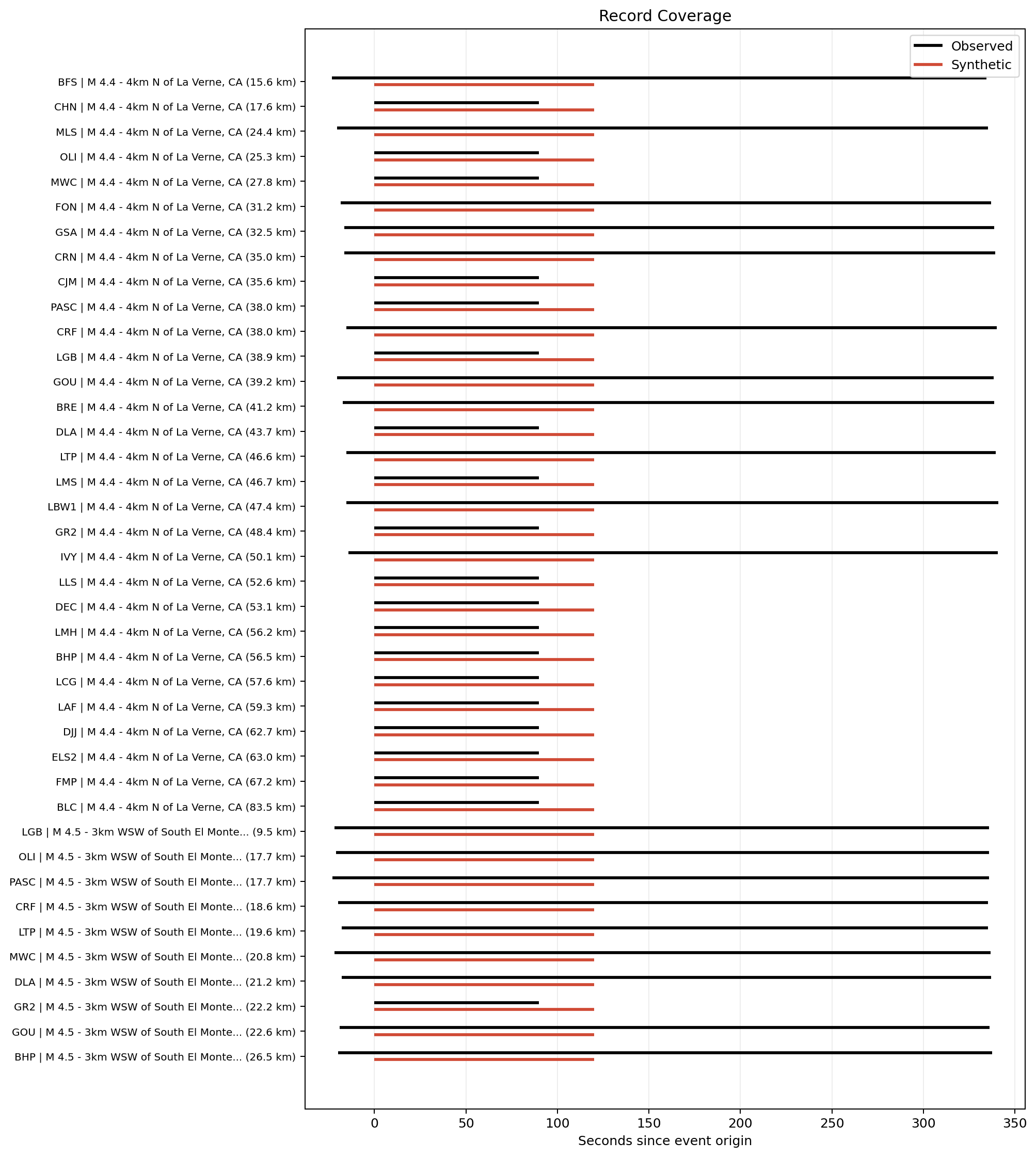
These figures give you a quick look at the stations, events, event-station coverage, and record coverage in the example subset.
[6]:
# Station-event context map: where the stations and events sit in the study area.
context_fig = plot_station_event_context(
    stations,
    events,
    add_basemap=add_basemap,
    auto_bounds_buffer_fraction=0.045,
    auto_bounds_min_buffer_deg=0.015,
    annotate_stations=True,
    annotate_events=True,
    showfig=True,
    savefig=True,
    close=True,
)

# Event beachball map: focal mechanisms with compressional quadrants colored by magnitude.
event_beachball_fig = plot_station_event_beachball_map(events, stations_df=stations, add_basemap=add_basemap, showfig=True, savefig=True, close=True)

# Station coverage figure: how many events are available at each station.
station_coverage_fig = plot_station_coverage(event_stations, showfig=True, savefig=True, close=True)

# Event coverage figure: how many stations are available for each event.
event_coverage_fig = plot_event_coverage(event_stations, showfig=True, savefig=True, close=True)

# Record coverage figure: observed and synthetic record windows for each event-station pair.
record_coverage_fig = plot_record_coverage(record_coverage, showfig=True, savefig=True, close=True)
Run time: 5.73 s